Do you know how to remove an unwanted background from an image? The process is called image background removal / clipping path. Through this post I would like to share a tutorial with you all related to "how to remove the background from an image?".
Please go through the link: Image Background Removal Tutorial
I believe that this tutorial is really very helpful to you.
Showing posts with label image clipping tutorial. Show all posts
Showing posts with label image clipping tutorial. Show all posts
Thursday, May 20, 2010

Saturday, February 27, 2010
Hand drawn clipping path
Image background removal by using Adobe photoshop.
Easy steps to clip the image / photo…
Step 1. Open the image / photo from file menu> select the pen tool from tool box and select the path and add to path area + from menu bar. Then outline the image / photo with pen tool or Lasso tool. Pen tool is more accurate but magic wand tool is also used for this.
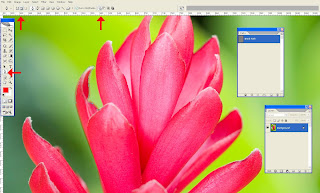
Step 2. After creating the image clipping, save the work path by double clicking on the work path or save path from path window.
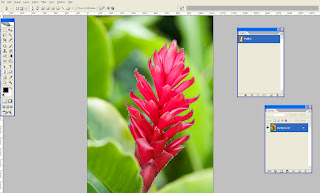
Step 3. Now we can able to select the traced path (use Ctrl + Enter or right click and make selection) and possible to move somewhere with help of a move tool.
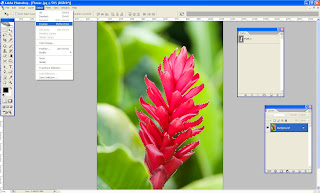
Step 4. After selecting the object go to the menu bar and select >Inverse (Shift +Ctrl + I)
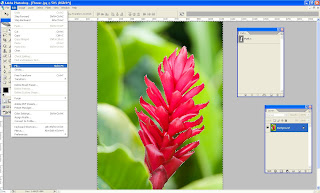
Step 5. Select the background and fill the color from Edit >fill (select background color or foreground color)
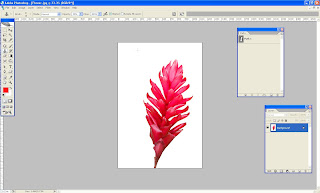
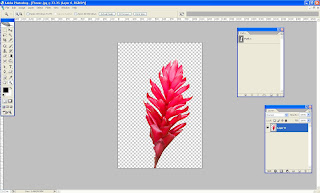
Step 6. Also we can make transparent background too. When you should unlock the layer (Double click the layer on the layer pallet) and inverse the selection and finally delete the background.
Let's give it a try!
Easy steps to clip the image / photo…
Step 1. Open the image / photo from file menu> select the pen tool from tool box and select the path and add to path area + from menu bar. Then outline the image / photo with pen tool or Lasso tool. Pen tool is more accurate but magic wand tool is also used for this.

Step 2. After creating the image clipping, save the work path by double clicking on the work path or save path from path window.

Step 3. Now we can able to select the traced path (use Ctrl + Enter or right click and make selection) and possible to move somewhere with help of a move tool.

Step 4. After selecting the object go to the menu bar and select >Inverse (Shift +Ctrl + I)

Step 5. Select the background and fill the color from Edit >fill (select background color or foreground color)

Step 6. Also we can make transparent background too. When you should unlock the layer (Double click the layer on the layer pallet) and inverse the selection and finally delete the background.

Let's give it a try!
Subscribe to:
Posts (Atom)