Showing posts with label image clipping services. Show all posts
Showing posts with label image clipping services. Show all posts
Thursday, June 03, 2010

Thursday, March 11, 2010
Clipping Path Services
Clipping path / Image clipping is one of the main image editing services. Clipping path services also known by the name image background removal services.
Clipping path is a vector line description fixed into your photograph file that tells software where to "clip" the image. After applying clipping path, the area outside the path is skipped from the output. Now a day’s clipped images are used in many businesses.
There are large numbers of clipping path service providers around the world. They provide quality and cost effective image clipping services. But choosing the right one is really a hard job. By letting the right provider to do your image clipping work and thus you can save the time and cost and you can concentrate more on your other works.
Clipping path is a vector line description fixed into your photograph file that tells software where to "clip" the image. After applying clipping path, the area outside the path is skipped from the output. Now a day’s clipped images are used in many businesses.
There are large numbers of clipping path service providers around the world. They provide quality and cost effective image clipping services. But choosing the right one is really a hard job. By letting the right provider to do your image clipping work and thus you can save the time and cost and you can concentrate more on your other works.
Saturday, February 27, 2010
Hand drawn clipping path
Image background removal by using Adobe photoshop.
Easy steps to clip the image / photo…
Step 1. Open the image / photo from file menu> select the pen tool from tool box and select the path and add to path area + from menu bar. Then outline the image / photo with pen tool or Lasso tool. Pen tool is more accurate but magic wand tool is also used for this.
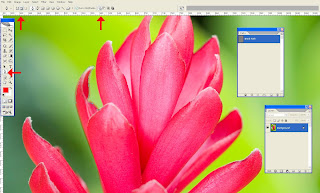
Step 2. After creating the image clipping, save the work path by double clicking on the work path or save path from path window.
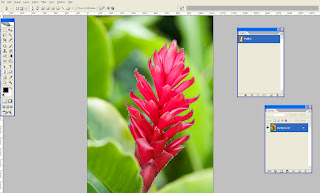
Step 3. Now we can able to select the traced path (use Ctrl + Enter or right click and make selection) and possible to move somewhere with help of a move tool.
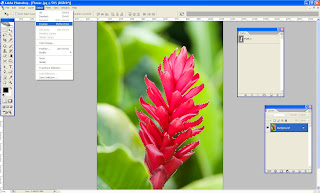
Step 4. After selecting the object go to the menu bar and select >Inverse (Shift +Ctrl + I)
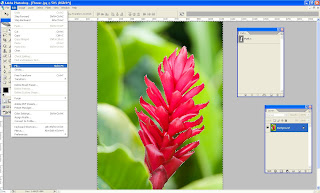
Step 5. Select the background and fill the color from Edit >fill (select background color or foreground color)
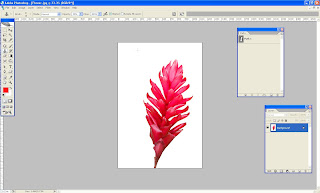
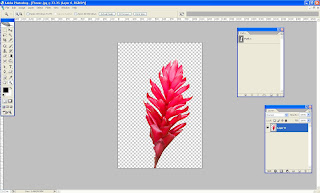
Step 6. Also we can make transparent background too. When you should unlock the layer (Double click the layer on the layer pallet) and inverse the selection and finally delete the background.
Let's give it a try!
Easy steps to clip the image / photo…
Step 1. Open the image / photo from file menu> select the pen tool from tool box and select the path and add to path area + from menu bar. Then outline the image / photo with pen tool or Lasso tool. Pen tool is more accurate but magic wand tool is also used for this.

Step 2. After creating the image clipping, save the work path by double clicking on the work path or save path from path window.

Step 3. Now we can able to select the traced path (use Ctrl + Enter or right click and make selection) and possible to move somewhere with help of a move tool.

Step 4. After selecting the object go to the menu bar and select >Inverse (Shift +Ctrl + I)

Step 5. Select the background and fill the color from Edit >fill (select background color or foreground color)

Step 6. Also we can make transparent background too. When you should unlock the layer (Double click the layer on the layer pallet) and inverse the selection and finally delete the background.

Let's give it a try!
Subscribe to:
Posts (Atom)